Back to Main Menu




With the start of term approaching, do you know your calculator options?

It’s that time of year again: teachers, parents and (perhaps to a lesser degree) students are thinking about going back to school and how to get the term off to the best possible start.
We can imagine that, for maths teachers, this often leads to questions about calculators, and what devices are best-suited to learners of varying abilities and at different stages in their education.
Casio provides a range of powerful technology to support all classes and students. We also like to share expert insights into the features, benefits and classroom applications of specific calculator models, alongside dedicated resources and support to help you gain maximum benefit from your devices.
Ongoing support from year 7 to GCSE
In the early years of secondary school, a reliable calculator is a powerful tool for students as they build their mathematical foundations and prepare for the challenges of GCSE.
The fx-83GT CW+ and fx-85GT CW+ are the entry-level models in the ClassWiz+ scientific calculator range. They are excellent options for teachers and students seeking a well-equipped handset offering all the functionality needed in the early years of secondary education.
Highlights include the FORMAT key, which lets you perform instant standard-to-decimal conversions with a single press. Inputting SHIFT and FORMAT brings up a full menu of other conversion options, including standard form.
You’ll also notice that this menu has numerical shortcuts for quick access to the option you need. Shortcuts have been added to all menus on handsets across the ClassWiz+ range, for quicker and easier navigation.
Another noteworthy feature of all of our scientific calculators is the FUNCTION key. This opens up new possibilities to define and evaluate functions outside of Table mode, and to analyse functions in terms of another function.
Casio training instructor and former teacher Simon May also highlighted the value of this key for reducing the risk of manual input errors.
“The FUNCTION key makes life a lot easier, simply because you don’t have to input values and possibly make an input mistake,” he said. “So, if you have a quadratic such as x2 +\ 2x\ +\ 3\ and you want to evaluate that, you can, without having to actually input the equation and enter a number where x is.”
Tackling advanced GCSE and A-level learning
The fx-83GT CW+ and fx-85GT CW+ are powerful enough for a large proportion of students to navigate the GCSE maths syllabus and do well in their exams.
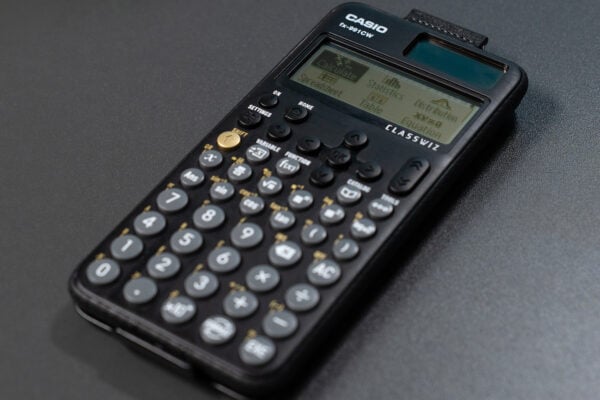
For those sitting higher-tier papers and planning to progress to A-level maths, we recommend the fx-991CW+ UK, the ultimate scientific calculator, or better yet our full-colour graphic calculator, the fx-CG100.
The fx-991CW+ UK is fully tailored to the UK mathematics curriculum and provides all the functionality you’ll find on entry-level scientific handsets, including greatest common divisor, least common multiple and recurring decimals.
Moreover, it offers advanced applications not found on other ClassWiz+ devices, such as equation solving, complex number calculations and numerical calculus.
A-level students who have been using the fx-83GT CW+ or fx-85GT CW+ will need to transition to at least the fx-991CW+ UK before the start of year 12.
Those who choose to go graphic with the fx-CG100 can take advantage of an even broader range of functionality, most notably graph drawing.
When working with a topic such as simultaneous equations, the graphing capability available on the fx-CG100 allows stronger connections with the maths and deeper understanding.
Rather than relying on rote learning and following formulaic, not particularly engaging processes, students can graph the different variables in the equation and get instant visual feedback on how they relate and interact with one another.
“There are three different ways of approaching simultaneous equations on the fx-CG100: graphically, numerically and even within the Equation app, which specifically is set up to solve simultaneous equations,” Simon elaborated. “And it will present answers in exact form if needed, or as decimals.”
Users of these higher-spec models will see the advantages in various areas of their mathematical learning, while teachers will benefit from greater efficiency and depth in lessons.
It always comes back to the teacher
As powerful as they are, calculators are only a support for learning. Like any tool, their effectiveness depends on how they’re used.
Everything starts with the teacher, so you need to feel completely comfortable with any calculator being used in your classroom.
One point Simon was keen to stress is that getting the best out of a calculator often comes down to using it efficiently. This relies on teachers and students having a good understanding of what their handset is capable of, so when they’re faced with a question, they instantly know how the calculator can help them.
This is an area where Casio wants to provide as much support as possible, to help you and your students maximise the benefits of your calculators by knowing everything they can do.
For the growing number of schools and students adopting graphing technology, we offer free, expert-led training sessions that provide an introduction to the fx-CG100. These events showcase some of the key features of the handset and how they can be applied to particular A-level maths topics.
You can sign up here.
We’re also constantly expanding our library of resources showing the benefits and applications of our scientific calculators. You can find short guides and videos on topics including:
Recommended
Making the most of the fx-991CW+ UK for GCSE Higher maths
Read more
Exam readiness: the case for starting early
Read more
How to improve algebraic fluency at A-level
Read more